Smash Time

Your court, measured.

Put one phone on the gallery rail and record your game. Smash Time works out where you and your opponent stood, in metres.

Then its coach gives you two or three things to work on. Each one shows the number and the rallies it came from.

Free, with no account. The web app is live. The iPhone and Android apps are in beta testing and not in the stores yet.
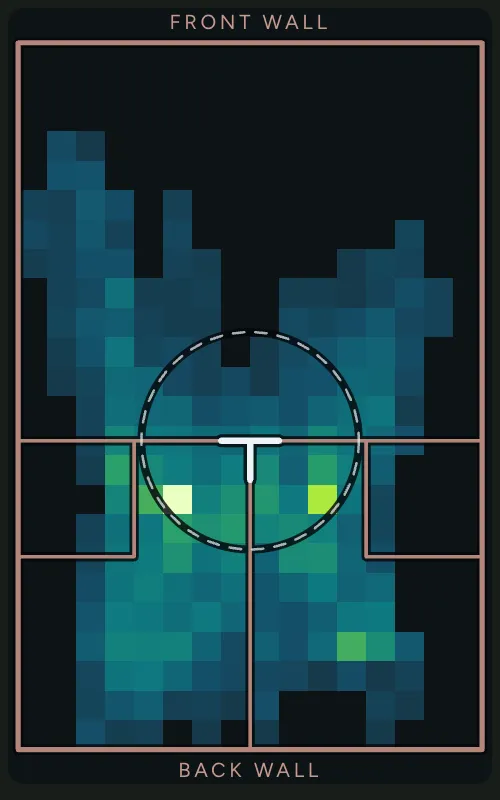
A heatmap of a squash court, front wall at the top. Most of the colour sits behind the T and down both side walls, with the brightest squares just either side of the T.
Where one player stood in game 1 of the women’s final at the Auckland Open 2021. Each square shows how long they spent there.

Real numbers from a real match

The same game, measured by the same process your video goes through.

634m
ground covered
59%
of rally time on the T
1.91m
average distance from the T
14:53
of play recorded

Game 1, women’s final, Auckland Open 2021, from the broadcast. Sample footage of two pros, so neither of them is you. With your own sessions, the app asks which player you are.

How it works

You do the first two steps. The app does the rest.

  1. Film the court

    Clamp your phone to the gallery rail, sideways, and press record. Or upload videos you already have, several at once.

  2. Mark the court

    On one frame, mark the four floor corners and the top of the tin at each side. The app can try to find them for you. Check them and fix any that are off.

  3. Measure

    The app finds both players’ feet in each frame and places them on the court in metres. It runs in the cloud, or on the iPhone itself.

  4. Read it

    See time on court, ground covered, how much you held the T, and a heatmap. Then open the coach.

What you see

The app on a phone, with the sample games loaded.

  • The Session screen: the game’s title, four figures (14m 53s on court, 634 m covered, 59% on the T, 16 rallies) and a chart of the rallies.
    Session. The main figures first, then the rallies and where you played.
  • The Coach screen: a summary of three things from the last session, then a ranked list of priorities, each marked Keep doing or Watch.
    Coach. Your priorities, for the last session or across all of them.
  • The Sessions screen: totals at the top, then each session by date with its share of time on the T.
    Sessions. Every game, with how much of it you spent on the T.
  • The New screen: record with this phone, upload a video, or a YouTube link marked Coming soon.
    New. Record with this phone or upload a video. YouTube links are coming soon.

A coach that shows its working

“Get back to the T faster” is true of every squash player. Smash Time only tells you things it can point to in your own game.

Keep doing

You held the T more

Time you held the T

Higher is better. Compared with your opponent in this session.

Try this

Keep driving deep and take the next ball early.

See it in these rallies

  • Rally 1 00:49
  • Rally 8 08:57
  • Rally 15 13:26

A finding from the sample game, as the app shows it. In the app, each rally opens its video.

  • Every finding shows its number and what it is compared with: your opponent, your own earlier sessions, or published figures from professional matches.
  • Every finding links to its rallies, so you can watch the moments it is talking about.
  • No evidence, no finding. If the coach cannot point to the number and the rallies, it does not say it.
  • It tells you what it left out. Things the data cannot support are listed under “What the coach didn’t say”, each with the reason.
  • Share it. Send a session or the coaching as an image.

How accurate it is

Each measurement had to pass a check before the coach could use it. The check compares the app’s answer with footage a person marked by hand.

  • Where the players stood Passed Typical error 19 cm. Nine in ten positions within 47 cm.
  • Which player is which Passed Right in 96.3% of frames.
  • Time in play, from how the players moved Passed The seconds it counts as play were 91% play. Distance and time on the T came within 6% and 1 point of the hand-marked rallies.
  • Where each rally starts and ends, and its shot count Not passed Rallies are found from movement and shots from the sound of the court. Neither is exact enough yet, so the coach does not use them. Treat rally and shot counts as a rough guide.

Checked on the Auckland Open 2021 broadcast: 162 hand-marked player positions and 12 hand-marked rallies. A club court sounds and looks different, so these checks still need repeating on club footage.

Good to know

  • It does not track the ball.Every number comes from where the players stood and the sound of the court.
  • It asks which player is you.Tap yourself in the picture once per session. Until you do, the session says its numbers are a guess.
  • Measuring on the phone is iPhone only.It finds the play but does not list rallies or shots yet. Android and the web app measure in the cloud.
  • The Apple Watch checks itself automatically on your real sessions.Only when its wrist motion lines up with the video does a session show the shots it felt, and suggest which player is you. On every real session it checks those shots against the sound of the ball and your arm in the video, with nothing for you to do. Until they have agreed closely enough over several sessions, its figures are marked as a first look and the coach does not use them. That check is agreement between sensors, not a hand count, and so far it has only been tested on made-up data. Heart rate is not used.
  • Squash only, for now.Padel is planned.

Your data

  • No account, no sign-in, no analytics.There is nothing to sign up for.
  • Nothing leaves your device until you press the button.There is no background upload.
  • Uploads are for measuring, not keeping.An uploaded video goes to private storage to be measured, and is deleted after seven days.
  • Your results are saved on your device.Read the privacy policy for the detail.

See it for yourself

Open the sample games to look around, or record your next session.